Readable Tags, Verified Digests
published v1.0.0stable
Developers name container images by tag because tags are readable, but a tag is a mutable pointer: anyone who can push to the registry can repoint it, and every pipeline that pulls by tag silently runs the replacement. Pinning by digest closes that gap but trades readability for 64-character hashes. This experiment tested whether both can hold at once. One pipeline built an image, signed its digest with Cosign and attached a build attestation; a second pipeline, given only the tag, resolved it to a digest, verified the signature and attestation, and ran the job on that exact image. It worked. Keys were self-generated for the test and are being moved towards keyless signing.
Developers think in tags
Tags are how people talk about images. They appear in reviews, in pipeline files and in conversation, and they read like versions. A pipeline that names alpine_demo-dev looks pinned to something definite. It isn't.
A tag is a pointer, and pointers can be moved
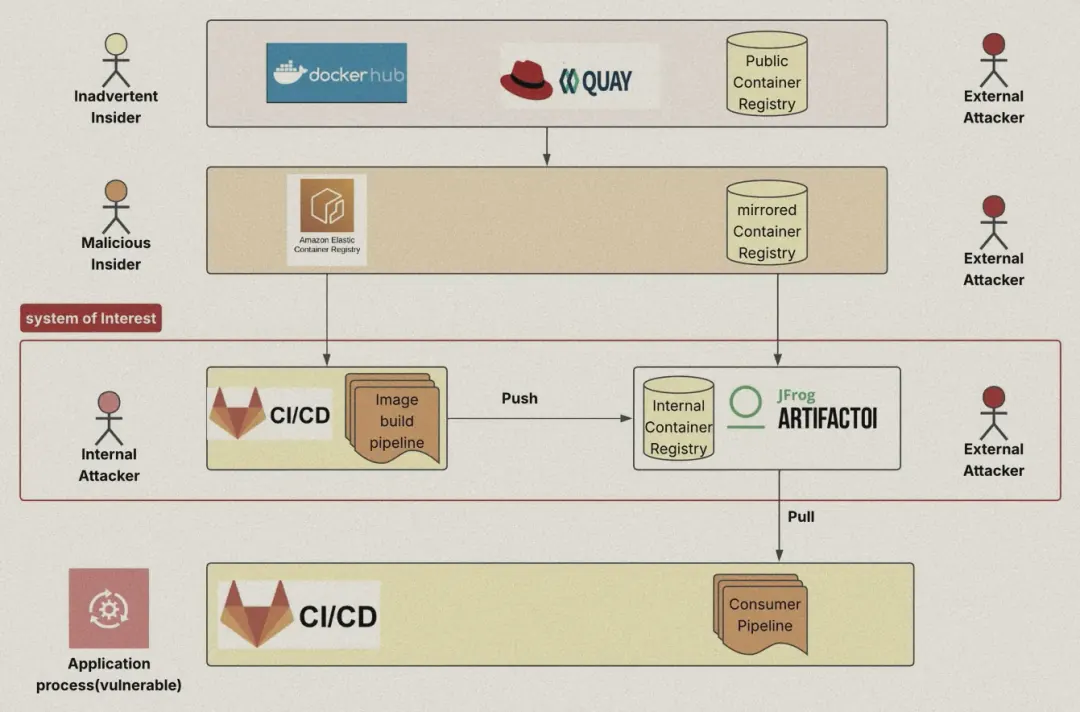
The system of interest: the build pipeline, the internal registry, and everyone who can reach them. Select any image to enlarge.
Images reach a pipeline in stages: from public registries, through a mirror, into an internal build pipeline and registry, and out to the pipelines that consume them. Around every stage sits someone who could change what a tag points to: an inadvertent insider, a malicious insider, an internal attacker, an external one.
None of them needs to touch the consumer's pipeline. Repointing one tag in the registry is enough. The consumer asks for the same name and silently gets a different image. Tags are mutable by design [1].
Pinning fixes integrity and costs readability
A digest is a SHA-256 hash computed from the image's contents, so image@sha256:… names exactly one image, byte for byte [2]. That solves the moving tag. But nobody reviews a 64-character hash, and every base-image update means editing digests by hand across pipelines.
So teams choose: stay on tags and accept silent drift, or pin digests and accept the friction. My hypothesis was that you shouldn't have to choose.
Let people write tags. Let the pipeline insist on digests.
Sign the digest, resolve the tag
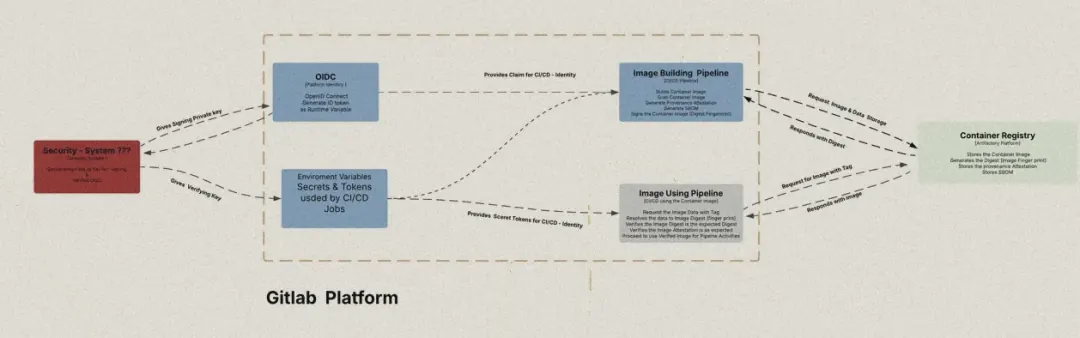 The design: two pipelines share a registry. One signs; the other verifies before it trusts anything. The red key-management system is still an open decision.
The building pipeline does the hard part once: it records the image's digest, signs it, and attaches an attestation describing which pipeline built it. The using pipeline is given only the tag. It asks the registry what the tag currently resolves to, then refuses to run anything whose signature or attestation doesn't check out.
Build, sign and attest
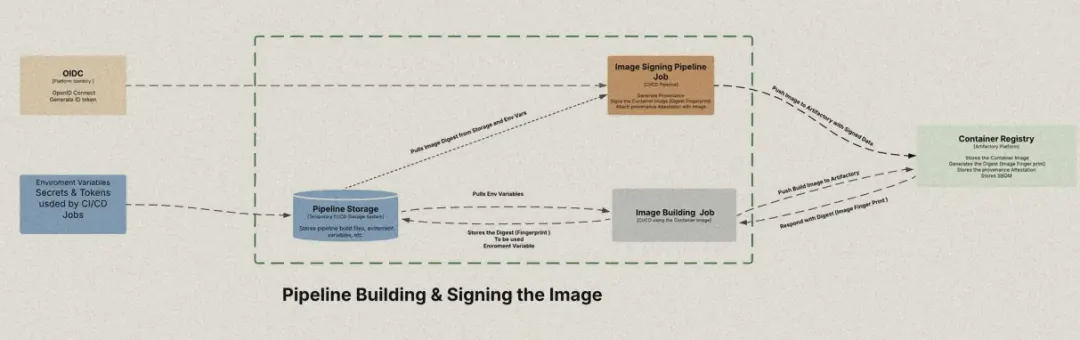 The building pipeline: build and push, keep the digest, then sign and attest it.
- Build the image with Buildah, push it to the registry and tag it.
- Read the digest back from the registry and keep it for the next job.
- Sign the image by digest with Cosign [3].
- Generate an attestation of the build, using claims from the CI platform's OIDC token.
- Attach the attestation to the signed digest.
{
  "buildType": "https://gitlab.com/gitlab-org/gitlab/ci",
  "builder": { "id": "${CI_CONFIG_REF_URI}" },
  "invocation": {
    "configSource": {
      "uri": "${CI_PROJECT_URL}",
      "commit-id": { "sha1": "${CI_COMMIT_SHA}" },
      "entryPoint": "${CI_JOB_NAME}"
    }
  },
  "metadata": {
    "buildInvocationId": "${CI_PIPELINE_ID}",
    "buildFinishedOn": "$(date -u +%Y-%m-%dT%H:%M:%SZ)"
  }
}
The minimal attestation. Its builder ID is what the using pipeline checks later.
Resolve, verify and run
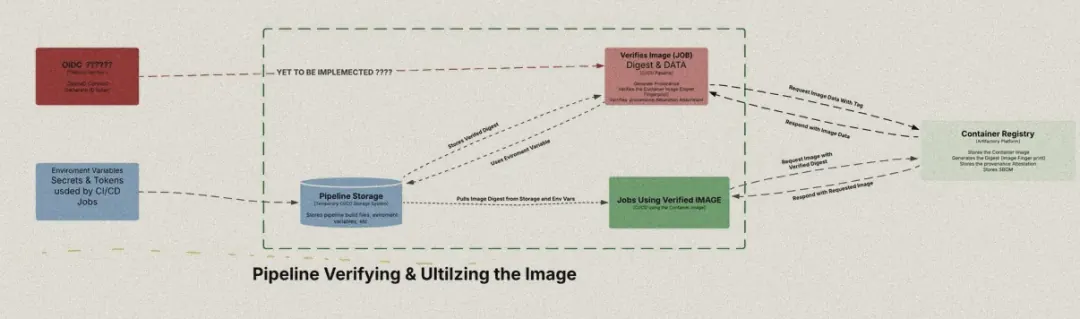 The using pipeline: verify once, then every job pulls by the verified digest. The red OIDC link was out of scope.
- Resolve the tag to its current digest.
- Verify that the digest carries a valid signature from the expected key.
- Extract the attestation and check that its builder matches the building pipeline.
- If both pass, store the verified digest in a pipeline variable.
- Run the job on
tag@digest, so it can only ever get the verified image.
Result
verify-and-run · pipeline #[n] passed ✓
- resolve: ✓ tag → digest
- verify: ✓ signature, ✓ attestation
- run: ✓ job on tag@digest
$ IMAGE=registry.example.com/demo/alpine:alpine_demo-dev
$ DIGEST=$(crane digest "$IMAGE")          # sha256:4bcff6…
$ cosign verify --key cosign.pub "$IMAGE@$DIGEST"
Verification for registry.example.com/demo/alpine@sha256:4bcff6… --
The following checks were performed on each of these signatures:
  - The cosign claims were validated
  - The signatures were verified against the specified public key
$ cosign verify-attestation --key cosign.pub --type slsaprovenance "$IMAGE@$DIGEST" \
    | jq -r '.payload' | base64 -d | jq -r '.predicate.builder.id'
[expected build pipeline]                 # matches ✓
$ echo "VERIFIED_IMAGE=$IMAGE@$DIGEST" >> verified.env
Job succeeded
A generic pipeline view of the run. Illustrative, with names and hashes elided, not a capture of the original.
The hypothesis held. The using pipeline was configured with nothing but the tag, yet it resolved the digest, verified the signature and the attestation, and ran the job on exactly the image the building pipeline had signed. Developers keep the tag. The pipeline gets the digest without anyone typing one.
What it doesn't cover yet
- Keys. The experiment used a self-generated Cosign key pair passed in as CI variables. I've since moved the keys into Vault, retrieved with the CI platform's OIDC token, and tested that flow.
- Identity. OIDC claims were only used to build the attestation. Verifying OIDC identity end to end was out of scope.
- The digest variable. Between jobs, the verified digest lives in a pipeline variable that a later job could in principle tamper with. I started a parent-child pipeline prototype to generate it in an isolated child pipeline; it hit an error I haven't resolved yet.
Next: keyless signing, a look at KMS alternatives, and removing long-lived secrets from pipelines altogether.
- Tags for people, digests for machines: signing lets you have both.
- The attestation ties an image to the pipeline that built it.
- Verification is only as strong as where its keys and results are kept.
References
- L. Rice, Container Security: Fundamental Technology Concepts That Protect Containerized Applications, 2nd ed. O'Reilly Media, 2025.
- Docker Inc., “docker image pull: Pull an image by digest (immutable identifier),” Docker Documentation. [Online]. Available: docs.docker.com/reference/cli/docker/image/pull (accessed 4 Aug. 2026).
- Sigstore, “Cosign,” Sigstore Documentation. [Online]. Available: docs.sigstore.dev
Ire o? (Blessings (good fortune to you), Yoruba),
Olarotimi
Revisions
Major versions are rewrites, minor versions add or clarify, patches fix.
- 1.0.0Build step 3e: projects, project pages and field notes
- 1.0.0Build step 3c: articles, article layout and the log
- 1.0.0Build step 2: content system (publish by adding a Markdown file)
Every change is recorded on the site log.